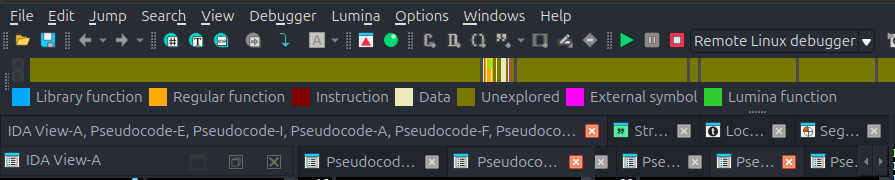
For quite some time I have been trying to figure out how to prevent Hex-Rays decompiler from opening multiple Pseudocode windows when you debug and enter new functions. The only switch I have found that impacts it somewhat is the “Use source-level debugging” button, but that seems to stop the synchronization between the IDA View (disassembly view) and the pseudocode entirely.
Is it possible to prevent IDA from opening multiple pseudocode windows when you enter new functions while debugging? It is very annoying when you set up sync between IDA View and Pseudocode A and you get pseudocode B, C, D, E, F… etc. and lose the sync.:
You’re not alone - this behavior with multiple pseudocode windows during debugging is something we are aware of. Unfortunately, we don’t have a solid workaround to propose at the moment.
Just to set the right expectations: this has already been added to our internal to-do list, and although we can’t provide a precise timeline at this point, this is something we’d like to improve in the (hopefully not so distant) future.
Hi @ida-user-2010 ,
We resolved a similar issue with single-stepping pseudocode and erratic window behaviour in IDA 9.3 release. Could you confirm whether you are still experiencing this problem?